Pages

Showing posts with label iPhone. Show all posts

A Little List of Things to Love...

S
A little list of things to love for the weekend. Something buttery-soft dark chocolate biker. Something artsy splattered paint Mickey. Something camo chrono for the wrist. Some white leather down under. A quilted golden bronze for the earcandy. And a Bird's Nest for the phone?

Time to check the credit card limit...ha!

From top, clockwise:

Leather biker lacket by Rick Owens
Mickey by... tee @ Uniqlo
Camouflage chrono watch by Michael Kors.
Schott x Converse All Stars 'Leather Jacket' white hi-top sneakers,
Quilted headphones by Audio Chi
'Bird's Nest' iPhone case by inCase

[pix by farfetch, uniqlo, michael kors, hypebeast, selfridges; inCase]
S

An Apple A Day...

S
Some people asks... do you really eat, coz you always look slim? Don't you ever eat any junk food? Don't you ever had any cravings?

Well, the answer is easy: of course I do! I do eat junk food and I do have cravings. And my biggest weakness is the donuts from Big Apple, which I think would satisfy any sweet toothers out there as well. My most fav is the Alien - with chocolate dip and filling, and all the choc strips toppings that is voluptously delicious! I would say... a Big Apple a day would keep my cravings away...


But how do I still can maintain my weight? That's an easy question to answer. Eat fruits! They have fibers that can fill you tummy without the danger of increasing weight. But do remember to eat it before any meal, coz when you eat it after meal it can make you feel bloated due to the gases being produced as a result of the digestion. Oh, another thing that I learned from an old friend - eating fruit before meal could help combat undereye bags and the 'panda' eyes too.

My ultimate must have is of course... Apple! Apples have pectin, by which if you eat it prior eating any sugary foods will help to regulate the sugal level in your body. All in all... just by eating apples I got at least three benefits in one! So, an apple a day keep the beauty won't go away...


And last but not least is another 'apple'. The iPod Shuffle, iPod Touch, iPhone, iPad... these Apple would definitely keep my tech savvy cravings away... =)

S

A Surreal Sunday Start: Thanks Irina!

S
It's a great start of a Sunday morning. I woke up early as usual and the first thing that I always do is picking up my iPhone to check out my email and Facebook, seeing who's who doing what. But this morning it's a bit different. As I flipped through the Live Feed and scroll down all the entries in the Facebook, suddenly I saw this entry by Irina Shabayeva fan page, which I become a 'Like' fan last night. I read thru the clippings.. and suddenly went.. WHAT???

I truly can't believe it. It's from my blog post! OMG! I can't believe it?! For real? One thing for sure: this is surreal. Surreal coz the designer herself read my blog. (Or is she? Hehe..).

Whatever it is, it's an honor to be featured in the fan page. Thanks Irina!!! And thank you for producing great pieces in your collection. Keep up the good work! Me and my friends really love your designs! =)

Oh, btw... I tweet last night that I wanna off Twitter for a week. Damn.. it seems that I can't coz by doing this entry it automatically went to the tweet account. All due to the Networkedblogs.com... ~ sigh ~


The original post...
(and now you can't see that I'm doing a dance..ha!)
S

Shop Till Your Battery Run Out!

S
First and foremost, I wanna give myself a big 'DUH!' and a slap on the forehead coz I've just learned how to 'print screen' from the iPhone/iPod Touch. Yeah, 'print screen' as similar to the one you do at any PC if you wanna save a picture but cannot really 'right click --> save as' kinda thing. Yes, THAT 'print screen'. I've just learned it by chance when I accidentally hit the on/off button together with the home button on my iPod Touch and suddenly came this 'shutter' sound out of nowhere. And voila... when I checked the Photos folder, I found I've just save an image in it. Brilliant. That means, from now on I can actually do more iPhone apps review without the need of a digicam to capture the image. Just awesome. Oh, fyi, it's my old iPod Touch, the one sans  the camera unlike the current gen that comes with dual cam. :)

Anyway, moving on to the review. Now picture this: You are sitting in a board meeting. Suddenly, in the middle of the presentation you start getting bored, and you have no idea what on earth the presenter is talking about. Especially when he started crunching numbers and figures with decimal points outnumbered the populations of China, and the font size 16 that you barely see as if you can use a binocular just to read out from the screen. And you are sitting far, far back there ... where hearing the presenter is also a huge effort to do. Isn't it daunting? Suddenly your mind wandering around, you start having this urge: I wish I could go shopping RIGHT NOW! But you can't coz you are in a board meeting, silly. So what you do? And oh, you have an iPhone too btw... so, what you do?

Don't worry... there's an app for that! (don't you just wanna slap me when i use that phrase again, ahaks!)

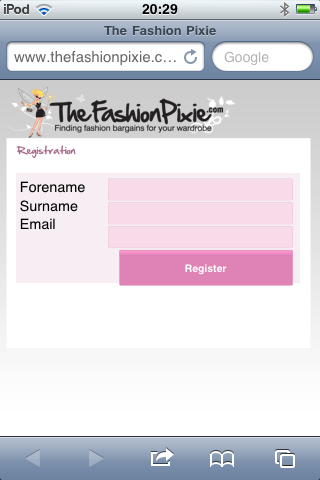
Okay. I'm gonna give you some of the app that you can use to shop. The first one is not really an e-shopping app, rather it's an app to help you find bargains out there on the highstreet. It's called: The Fashion Pixie. What it do is basically search for stores that are having discounts either in-store or online, ranging from the departmental stores like Debenhams or Harvey Nicks to the highstreet chains like River Island, Gap and New Look, to even e-shopping sites like Asos and MyBag.

If you touch on any of the list, it'll bring you to another 'page' giving you further details like percentage discounts, validity period of the sale, what you could look for, etc etc. So what you can do after that is to check it in-store yourself right after work or click on the e-shopping websites. Pretty cool.


Another app that I really like is actually originated from it's own website i.e SHOPSTYLE. What I like about ShopStyle is its one-stop shop approach where you can actually find anything which is about everything you wish for coz the site is like an RSS feed that brings together all websites into one, giving you a big time-saving and ease of search. Whether you're looking for a high-end brandname like Gucci and Armani, to the highstreet stores like what i mentioned before - it's all there.


How does the app work?
  • Right after the first 'cover' page, it'll bring you to the 'departments' like Women, Men, Kids & Baby and Home. 
  • Click on one of them, for instance I click 'Men' - it'll bring into another page with another choices to shop: Accessories, Jeans, etc... etc.
  • When I click Accessories for example, it'll bring me into another page with the list of either I wanna go for Bag, Belts, Gloves & Scarves...etc.. etc. Now let me try with Bag.
  • In 'Bag' section, the true list of available bags out there in the market is laid out in the bare. As you can see there are about 1150 items, ranging from rucksacks, holdalls, totes, so on and so forth. Well, you can browse thru all of that or if you're like me, I choose to further refine the search. I went for 'Brand' i.e. Gucci.
  • And voila... there's only 3 Gucci available. Oh, fyi it doesn't really go to the original store. For instance, for that Gucci all the bags are not really from official Gucci site, rather from other webstores like Yoox, Matches, Farfetch and the likes. That's why the quantity is limited.
  • Click on one of the bag, it'll further give the details like from where it is sourced at, the price, the size etc.
  • If I decided to buy, just click the 'Buy' button and it'll forward me to the respective store (like that Gucci, to Matches Fashion website).
  • Or if I wanna wait for it to go on sale, you know to save budget, I can just click on the 'Alert' button. Nope, it won't give you the fire alarm!
  • I can also add it into my wish list or 'favorite' if I decided not to buy now. I can even tweet or share it on Facebook too.
  • You can also change other settings like to sign in into your account if you have one, and you can also set a new account using the app itself. You can also set the 'Sale Alert', your current location, which twitter account to use for, etc etc.
Overall, it's very interactive, intuitive and easy to use. One thing to make sure, have your credit card ready!

And oh, this app only apply for Japan, US and some European countries. For the previous one, Fashion Pixie, is only valid in the UK. Whoopps..!

Anyway, I just wish these kind of apps would be rolled out to all over the world. Aren't we all love to shop? And no matter where we are - in the board meeting, or on the move or even during holiday by the beach - we can still shop. Why? Coz there's always an app for that! =)

P/S: Just wait for my other iPhone apps reviews...


S

iPhone Table

S
iPhone dock? Check. iPhone covers in many designs and patterns? Check. iPhone wireless headpiece? Check. So, what else people could come up with in complementing your iPhone? A table? You must be kidding me, right. But that's what I saw at Shortlist previously when they include this iPhone table in a fully-functioning just like the phone itself.

In a glance, this table is just a typical glass-top with all its quirky legs and stuff. But with a 58" multitouch capability 'screen', once you connect your iPhone/iPod Touch via the docking cable (and a special app) - voila! It can rival even the 10" iPad itself! Scrolling, flipping pages to pages, pinch to zoom in zoom out; this table is indeed what the giant should have. Awesome.

Wanna see how it truly works? Check out the video demo from the inventor himself. Fantastico!


[pix and video from shortlist]
S

DSStyles' Pure Series Silicone Case

S

I got these iPhone 4 cases way before I applied for the Apple's iPhone4 Case program. I actually wanna make a smooth transition from my previous iPod Touch to my iPhone4 by having the silicone case coz I hate for it to get scratched and the feeling it may slipped away from my hand when I hold it. So, a silicone case is kinda brilliant choice since it feels slightly rubbery and having better 'friction'.

This one is from DS Styles. I think they have the best silicone case coz it is made of high quality plastic which doesn't tend to get 'distorted' in shape unlike some available in the market. The best part, it attracts less dirt on its body making the whole phone much cleaner when I'm using it.

The downside: the back part of the phone seem to show some 'bubble patches' due to it doesn't really sticks well to the phone. But, it can be easily solved by making sure there's no air present when you put this case on.

The price is quite affordable and it took about a week to arrive from the online retailer that is based on the Far East. I'm quite pleased with this silicone cases. I bought two - in translucent grey and a colorless. Very light and looks awesome with the phone.

S

The Cases: Look Who's Watching...?

S

Something to accessorize your gadgets from Jack Spade. The silicon cases that are moulded to fit perfectly for your iPhone, iPod Touch and iPod nano. I love the wandering eye thing on the back cover that adds to the fun character to this cases. :)


case for iPhone 3G/3GS


case for iPod Touch 2nd Gen


case for iPod nano 5th gen with camera cutout

[pix from jack spade]

S

Antennagate Solved with InCase Snap Case

S
To my knowledge never ever in history of new Apple product being released to the masses will create such a fracas like iPhone 4. Yes, I'm talking about the antennagate. While every gadget geeks are amazed by the beauty of the phone, who would've thought that prior 24th June when iPhone 4 made its debut to the public, there is such thing as 'oh, you can't hold it like that' just to get good reception when you make your call. Not that I know, no. Having so many mobile phones before never ever the reception issues would arise if I hold the phone in any way that I like. But nooo... not with iPhone 4, dude.

Still, does people really care with all the hooplas? I don't think so. As T3 magazine did their online poll recently showing that 42% of people don't have a problem at all with iPhone 4. Or only 10% really cares that when the phone 'wears' a bumper, the the issue solved. Period. Well, I can say I'm one of those 42% and 10% really... coz I don't have any problem so far. Yeah, maybe the reception bars are not that full coz that depend on the coverage in that particular area. Yet I manage to surf the web and make call and tweet and fb-ing on the go as swiftly as I can imagine.

Anyway. For those who bought the phone, bear in mind that Apple's gonna give free cases for the sake of solving the attennagate issues. How to claim your free case/sleeve? Just download the iPhone 4 Case Program app from the iTunes and you'll be directed to the step-by-step process; from registering your details to choosing the cases of your choice (example is in the pix below from iLounge)

I've chosen mine. It's the InCase Snap Case for iPhone 4. It took almost 4 weeks for it to arrive. What made me choose this one instead of the iPhone bumper by Apple? Simply because it's the skinniest in the bunch. This thin shell is made of highly durable plastic whih I think a polypropylene or polycarbonate. It's very light and thin, and the frost black color goes well with my black iPhone 4.


As the name goes, just snap it in and voila! My phone is protected from any scratches and bumps. It has cutouts at the top and the bottom, as well as on the left side for the volume control. It also features a Flash Ring that surrounds the camera cutout, by which Incase claims that the innovative feature is designed to prevent glare interference during camera usage when the iPhone 4 is in the case. The Flash Ring ensures crisp images, eliminating unwanted photo distortion when shooting with or without flash.

The most important, this simple no-fuss design made my iPhone4 feel secure in it without feeling any wobbly wibbly bit which could let it flop out. It's so light which doesn't add much weight to the already hefty iPhone 4 and seem to be dust-free too!

Another question is: does it solve the antenna problem? I'm afraid I have to answer that as yes, it does. I dunno what's the magic - but the bars seem to increase a lot. So does the quality of reception!


Oh, Incase also throw in the phone stand which is reversible. Great if you wanna charge the phone without it lying flat on the desk, or to watch the video handsfree. =)


S
 

Most Reading